Documentation
Documentation
Everything from install to feed — one page, no fluff.
Getting started
Free tier included: 25 generations per site — no account, no card.
Requires WordPress 6.0+ and WooCommerce 7.0+.
- Install the zip in WordPress under Plugins → Add Plugin → Upload Plugin, then activate. (A WordPress.org listing is on the way — until then this direct download is the official channel.)
- Free tier: nothing else to do — you have 25 generations for this site, no account needed.
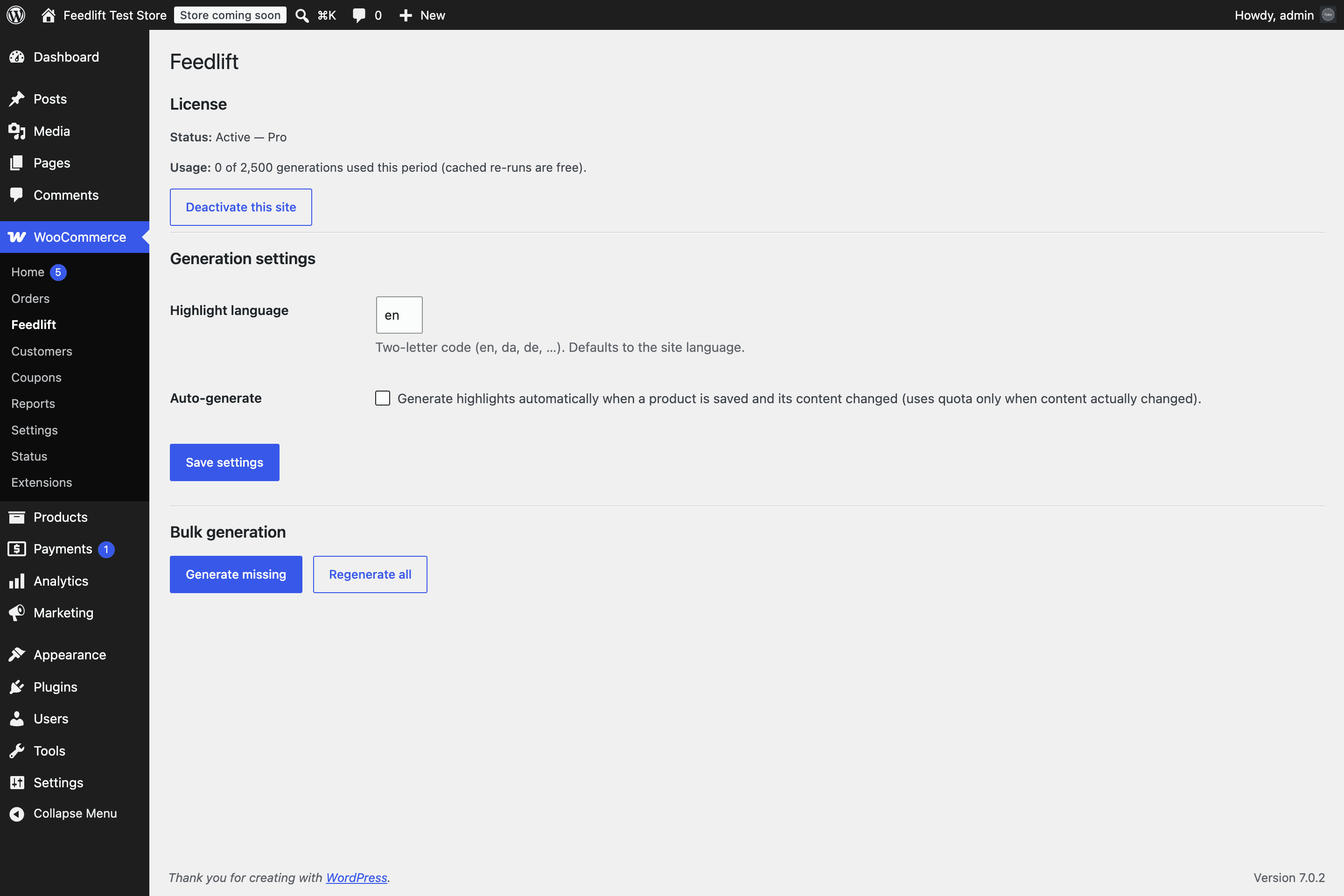
- Paid plans: go to WooCommerce → Feedlift, paste your license key (
fl_v1.…from your purchase email) and click Activate. The page then shows your plan, usage and bulk tools:
Staging and dev sites (localhost, *.test, staging.*, host-staging domains) are detected automatically and never use a production seat.
Generating highlights
Every product gets a Google Shopping tab in the product data box. One click on Generate with AIwrites 4–6 benefit fragments from the product's own title and description — validated against Google's spec before you ever see them (≤150 characters each, minimum 2, no promo text, prices, links or ALL-CAPS). Each highlight lands on its own numbered row: edit a line in place, remove it with the × button, or click + Add line to write your own. The text is yours.
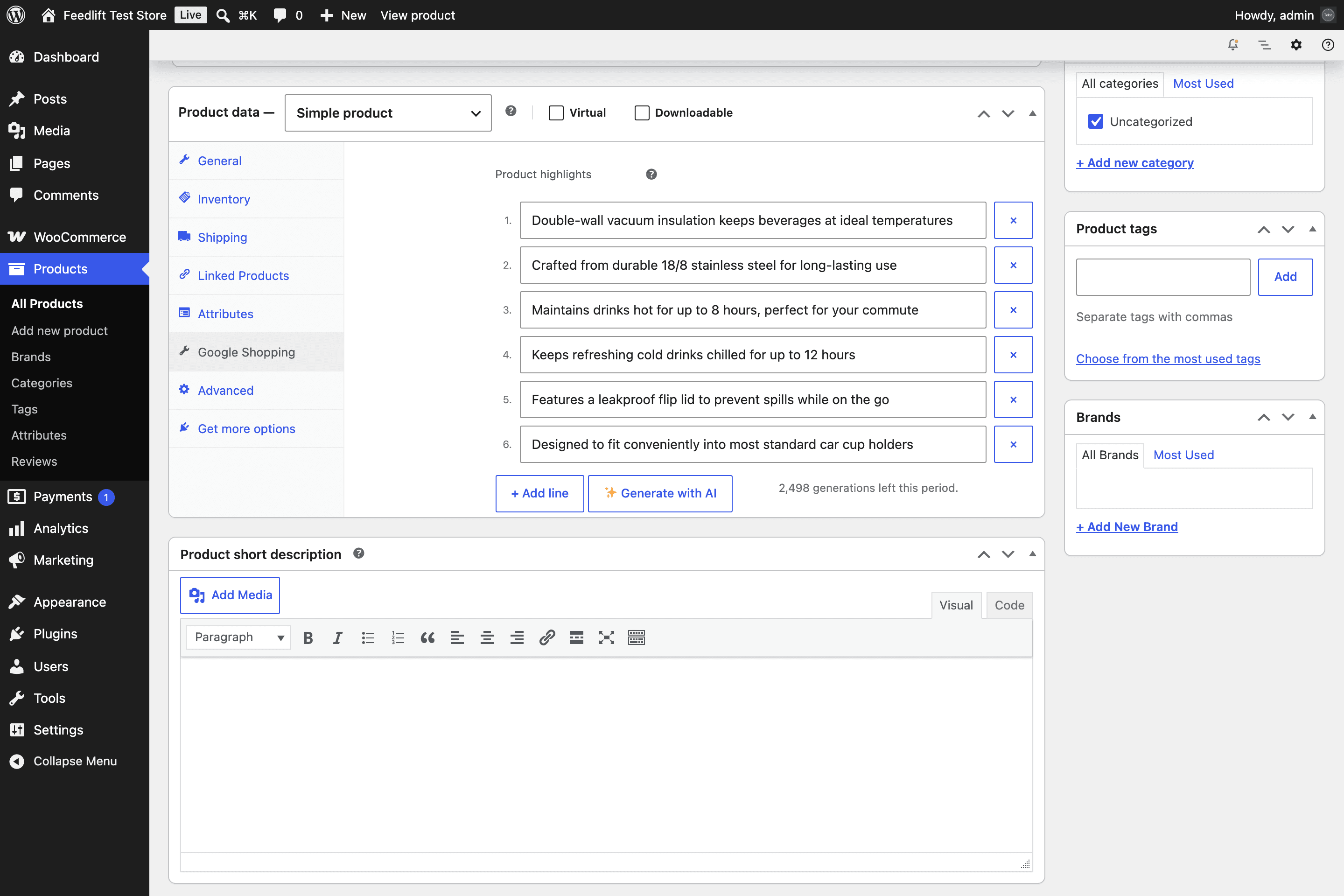
Re-running an unchanged product is served from cache and never counts against your quota. Optional: enable Auto-generatein settings to queue fresh highlights whenever a product's content actually changes (off by default).
Feed mapping
Feedlift saves highlights as plain product meta, so your existing feed pipeline picks them up without changing anything else:
- AdTribes Product Feed PRO / Elite: the fields appear in the attribute dropdown under Main attributes — map
google_shopping_highlightsto Google'sproduct_highlightattribute once, done. - Any other feed plugin (RexTheme, CTX Feed, WebToffee…): map the meta key
google_shopping_highlights(one highlight per line) orgoogle_shopping_highlights_csv— the CSV variant is pre-escaped per Google's multi-value rules (values with commas/colons wrapped in straight quotes, inner quotes doubled). - One-column-per-value feeds: every highlight is also written to its own indexed key —
google_shopping_highlight_1,google_shopping_highlight_2, … (up to 20) — for feed tools that map one attribute per key. Migrating from a setup that already mapped per-line fields? Those mappings keep working unchanged. - Custom/templated feeds:
$highlights = fl_get_highlights( $product_id ); // string[]
Submission format notes: Google accepts up to 10 highlights per product (recommends 4–6); fewer than 2 gets the attribute dropped with a warning — Feedlift never outputs fewer than 2. Prefer TSV over CSV in text feeds to avoid comma pitfalls; in XML use repeated <g:product_highlight> tags.
Structured data on the product page
Beyond the feed, the plugin also adds your approved highlights to WooCommerce's existing Product JSON-LD as additionalProperty values (one PropertyValue per highlight) — it extends the markup WooCommerce already emits rather than adding a second Product node. The JSON-LD is rendered server-side in the page HTML — no JavaScript needs to run for it to be present — so crawlers that read raw HTML see the same approved lines your feed carries. It only ever contains highlights you have approved on the product (and mirrors the feed rule: never fewer than two). On by default; toggle it under WooCommerce → Feedlift → Settings.
Bulk generation (paid plans)
Two buttons on the settings page, deliberately separate:
- Generate missing — only touches products without highlights. Safe to run any time.
- Regenerate all — re-runs the whole catalog. Unchanged products come back from cache for free; changed ones use quota.
Jobs run in the background through WooCommerce's own Action Scheduler in batches of 20, resumable, with progress shown on the settings page. Hitting your monthly quota stops the queue cleanly — nothing is billed beyond your plan, ever. A 10,000-product catalog completes as a background drip without touching your site's performance.
License & sites
- One license covers the number of production sites in your plan (Starter 1, Pro 3, Agency 10). Dev/staging sites are free.
- Moving domains? Nothing to do — the plugin carries a persistent site identity, so activating on the new domain re-binds your existing seat automatically.
- Lost or leaked key? Regenerate it in the portal — the old key dies instantly and the new one is emailed to you.
- Payment hiccup? Generation keeps working for 14 days while you fix the card (the plugin shows a notice linking to the billing portal).
- Cancelled? Everything already generated stays in your WooCommerce database. Only new generation and plugin updates stop.
API reference
The plugin is a thin client over this API — anything it does, you can script. Auth: activate once with your license key, then use the returned site token as a Bearer header.
Activate
POST /api/v1/license/activate
{ "key": "fl_v1.…", "site_url": "https://shop.example.com", "site_id": "<stable-uuid>" }
→ { "site_token": "flt_…", "entitlement": { "plan", "seats", "monthlyQuota", … } }
Generate (1–20 products per call)
POST /api/v1/generate
Authorization: Bearer flt_…
Idempotency-Key: <uuid>   # timeout-retries never double-bill
{ "language": "en", "products": [{ "id": "42", "title": "…", "description": "…" }] }
→ { "results": [{ "id": "42", "highlights": ["…"], "cached": false }],
    "usage": { "used", "remaining", "quota", "window_ends" } }
Usage
GET /api/v1/usage
Authorization: Bearer flt_…
→ { "plan", "status", "quota", "used", "remaining", "cache_hits", "window_ends" }
Status codes worth knowing: 402 quota reached (upgrade or top up), 409 seat limit or idempotency conflict, 503means "temporarily unavailable" — never a revocation; the plugin treats it as offline and keeps your local state.
Troubleshooting
- "All production seats are in use"
- Deactivate a site you no longer use in the portal (sites silent for 30+ days free their seat automatically), or upgrade the plan.
- Generation returns "could not produce spec-compliant highlights"
- The product's content is too thin for honest highlights — Feedlift refuses to invent features. Add a few concrete details (material, size, use case) to the description and retry.
- Highlights don't show in the feed
- Check the field mapping in your feed plugin and regenerate the feed file. AdTribes users: the fields live under Main attributes. The meta key must be
google_shopping_highlights(all lines in one value) orgoogle_shopping_highlight_1…_N(one highlight per key). - Merchant Center shows a highlight warning
- "Too few values" means a product was submitted with fewer than 2 highlights — Feedlift never generates that, so check for hand-edited or feed-truncated values on that product.
- Something else?
- Email km@teloz.net — include your site URL and what you clicked.